DNS
Required DNS entries
# redirect your domain to IPv4
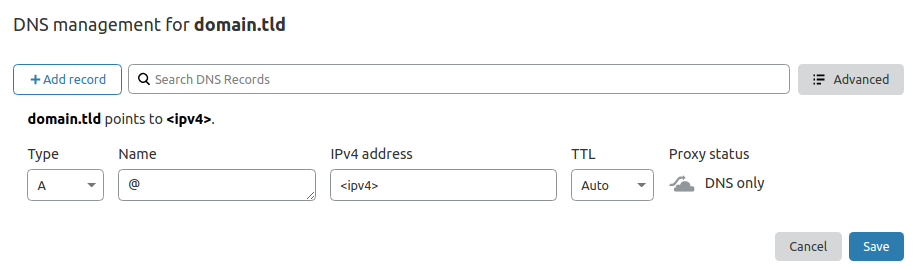
@ A <ipv4>

# redirect your domain to IPv6 (optional)
@ AAAA <ipv6>

# redirect all subdomains to IPv4
* A <ipv4>

# redirect all subdomains to IPv6 (optional)
* AAAA <ipv6>

# redirect some subdomains to other IPv4 (optional)
<subdomain> A <ipv4>

# redirect some subdomains to other IPv6 (optional)
<subdomain> AAAA <ipv4>

# allow letsencrypt.org to issue certificates for your domain
@ CAA 0 issue "letsencrypt.org"

# allow letsencrypt.org to also issue wildcard certificates for your domain
@ CAA 0 issuewild "letsencrypt.org"

# set email address for policy violations
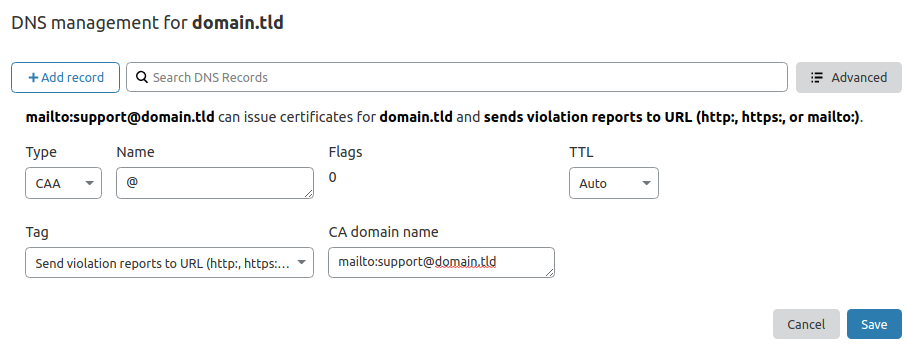
@ CAA 0 iodef "mailto:monitoring@domain.tld"
Cloudflare Name Servers
It is recommended to change the name servers of your domain to the Cloudflare name servers. Check out this (support.cloudflare.com) tutorial for your provider.
Example records for the Cloudflare DNS management:
Configure reverse DNS
The reverse DNS is used to obtain the domain attached to an IP address. You can do this in the server control panel.
Validate DNS updates
DNS Updates can take quiet some time!
Check IPv4 DNS entries
$ dig A <domain> @1.1.1.1

; <<>> DiG 9.16.1-Ubuntu <<>> A domain.tld @1.1.1.1
;; global options: +cmd
;; Got answer:
;; ->>HEADER<<- opcode: QUERY, status: NOERROR, id: 55520
;; flags: qr rd ra ad; QUERY: 1, ANSWER: 1, AUTHORITY: 0, ADDITIONAL: 1

;; OPT PSEUDOSECTION:
; EDNS: version: 0, flags:; udp: 1232
;; QUESTION SECTION:
;domain.tld.                     IN      A

;; ANSWER SECTION:
domain.tld.              300     IN      A       <ipv4 of your server>

;; Query time: 60 msec
;; SERVER: 1.1.1.1#53(1.1.1.1)
;; WHEN: Thu Nov 05 21:43:35 CET 2020
;; MSG SIZE  rcvd: 54
Check wildcard DNS entries
$ dig A nonexisting.<domain> @1.1.1.1

; <<>> DiG 9.16.1-Ubuntu <<>> A nonexisting.domain.tld @1.1.1.1
;; global options: +cmd
;; Got answer:
;; ->>HEADER<<- opcode: QUERY, status: NOERROR, id: 49020
;; flags: qr rd ra ad; QUERY: 1, ANSWER: 1, AUTHORITY: 0, ADDITIONAL: 1

;; OPT PSEUDOSECTION:
; EDNS: version: 0, flags:; udp: 1232
;; QUESTION SECTION:
;nonexisting.domain.tld.          IN      A

;; ANSWER SECTION:
nonexisting.domain.tld.   295     IN      A       <ipv4 of your server>

;; Query time: 30 msec
;; SERVER: 1.1.1.1#53(1.1.1.1)
;; WHEN: Thu Nov 05 21:48:11 CET 2020
;; MSG SIZE  rcvd: 65
Check CAA DNS entries
$ dig CAA <domain> @1.1.1.1

; <<>> DiG 9.16.1-Ubuntu <<>> CAA domain.tld @1.1.1.1
;; global options: +cmd
;; Got answer:
;; ->>HEADER<<- opcode: QUERY, status: NOERROR, id: 22461
;; flags: qr rd ra ad; QUERY: 1, ANSWER: 7, AUTHORITY: 0, ADDITIONAL: 1

;; OPT PSEUDOSECTION:
; EDNS: version: 0, flags:; udp: 1232
;; QUESTION SECTION:
;domain.tld.                     IN      CAA

;; ANSWER SECTION:
domain.tld.              300     IN      CAA     0 iodef "mailto:monitoring@domain.tld"
domain.tld.              300     IN      CAA     0 issue "letsencrypt.org"
domain.tld.              300     IN      CAA     0 issuewild "letsencrypt.org"

;; Query time: 30 msec
;; SERVER: 1.1.1.1#53(1.1.1.1)
;; WHEN: Thu Nov 05 21:45:38 CET 2020
;; MSG SIZE  rcvd: 283
Check reverse DNS
$ nslookup <ip>
reversed-ip.in-addr.arpa       name = domain.tld.

Authoritative answers can be found from:
Last update:
2022-01-09