Traefik
A reverse proxy is a router which binds to the ports 80 (http) and 443 (https).
You can access the configured services by connecting to the proxy (https://domain.tld) with a specific host header, which is going to be evaluated by the proxy.
But how do you connect to your proxy with this specific host header?
Due to the fact that you configured your dns to redirect all subdomains to your server you can simply access https://phpmyadmin.domain.tld.
You will reach the reverse proxy on port 443 with the host header phpmyadmin.domain.tld, after evaluation the proxy will redirect the incomming request to the configured service.
The following codeblocks contain everything for a dns challenge setup, if you would rather use a minimal configuration of traefik, checkout the docs.
Make sure you configured your dns correctly: domain.de need to point to your server.
# append /home/admin/services/main/docker-compose.yml
  traefik:
    image: traefik:v2.4
    command:
      - "--api.insecure=true"
      - "--metrics.prometheus=true"
      #- "--log.level=DEBUG"
      - "--accesslog=true"

      - "--providers.docker=true"
      - "--providers.docker.exposedbydefault=false"
      - "--providers.docker.network=proxy"

      - "--providers.file.directory=/configs/"

      - "--entrypoints.web.address=:80"
      - "--entrypoints.web.http.redirections.entrypoint.to=websecure"
      - "--entrypoints.web.http.redirections.entrypoint.scheme=https"

      - "--entrypoints.websecure.address=:443"
      - "--entrypoints.websecure.http.middlewares=mw_hsts@file,mw_compress@file"
      - "--entryPoints.websecure.http.tls=true"
      - "--entryPoints.websecure.http.tls.certresolver=myresolver"
      - "--entryPoints.websecure.http.tls.domains[0].main=domain.de"
      - "--entryPoints.websecure.http.tls.domains[0].sans=*.domain.de"
      #- "--entryPoints.websecure.http.tls.domains[1].main=domain2.de"
      #- "--entryPoints.websecure.http.tls.domains[1].sans=*.domain2.de"

      - "--certificatesresolvers.myresolver.acme.dnschallenge=true"
      - "--certificatesresolvers.myresolver.acme.dnschallenge.provider=cloudflare"
      - "--certificatesresolvers.myresolver.acme.dnschallenge.resolvers=1.1.1.1:53,8.8.8.8:53"
      - "--certificatesresolvers.myresolver.acme.dnschallenge.delayBeforeCheck=10"
      - "--certificatesresolvers.myresolver.acme.email=certificates@domain.de"
      - "--certificatesresolvers.myresolver.acme.storage=/letsencrypt/acme.json"
      #- "--certificatesresolvers.myresolver.acme.caserver=https://acme-staging-v02.api.letsencrypt.org/directory"
    labels:
      - "traefik.enable=true"
      - "traefik.http.services.srv_traefik.loadbalancer.server.port=8080"
      - "traefik.http.routers.r_traefik.rule=Host(`traefik.domain.de`)"
      - "traefik.http.routers.r_traefik.entrypoints=websecure"
    env_file: .traefik.env
    ports:
      - "80:80"
      - "443:443"
    volumes:
      - "/srv/main/traefik/letsencrypt:/letsencrypt"
      - "/srv/main/traefik/dynamic.yml:/configs/dynamic.yml"
      - "/srv/main/traefik/middlewares.yml:/configs/middlewares.yml"
      - "/etc/localtime:/etc/localtime:ro"
      - "/var/run/docker.sock:/var/run/docker.sock:ro"
    networks:
      - proxy

  static:
    image: nginx:stable-alpine
    restart: always
    labels:
      # BASIC CONFIGURATION
      - "traefik.enable=true"
      - "traefik.http.services.srv_static.loadbalancer.server.port=80"

      # ERROR PAGES
      # you can use my error_pages: https://github.com/felbinger/AdminGuide/tree/master/error_pages
      - "traefik.http.middlewares.error40x.errors.status=403-404"
      - "traefik.http.middlewares.error40x.errors.service=srv_static"
      - "traefik.http.middlewares.error40x.errors.query=/error/{status}.html"
      - "traefik.http.middlewares.error30x.errors.status=300-308"
      - "traefik.http.middlewares.error30x.errors.service=srv_static"
      - "traefik.http.middlewares.error30x.errors.query=/error/30x.html"

      # DOMAIN ROOT CONTENT
      - "traefik.http.routers.r_static_root.rule=HostRegexp(`domain.de`, `{subdomain:[a-z0-9]+}.domain.de`)"
      - "traefik.http.routers.r_static_root.entrypoints=websecure"
      - "traefik.http.routers.r_static_root.priority=10"
      - "traefik.http.middlewares.mw_static_root.addprefix.prefix=/domain_root/"
      - "traefik.http.routers.r_static_root.middlewares=mw_static_root@docker,error40x@docker,error30x@docker"
    volumes:
      - "/srv/main/static/webroot:/usr/share/nginx/html/"
    networks:
      - proxy
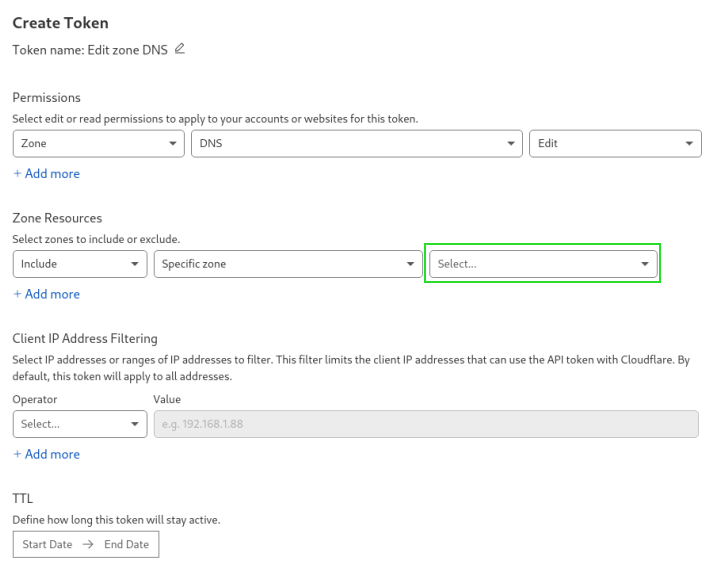
Aquire a api token from cloudflare:
# .traefik.env
CF_DNS_API_TOKEN=XXXXXXXXXXXXX
# /srv/main/traefik/middlewares.yml
http:
  middlewares:
    mw_compress:
      compress: true
    mw_hsts:
      headers:
        contentTypeNosniff: true
        browserXssFilter: true
        forceSTSHeader: true
        sslRedirect: true
        stsPreload: true
        stsSeconds: 315360000
        stsIncludeSubdomains: true
        customResponseHeaders:
          X-Forwarded-Proto: https
          X-Frame-Options: sameorigin
# /srv/main/traefik/dynamic.yml
tls:
  options:
    default:
      minVersion: VersionTLS12
      sniStrict: true
      cipherSuites:
        # TLS 1.3
        - TLS_AES_256_GCM_SHA384
        - TLS_CHACHA20_POLY1305_SHA256
        - TLS_AES_128_GCM_SHA256
        # TLS 1.2
        - TLS_ECDHE_RSA_WITH_AES_128_GCM_SHA256
        - TLS_ECDHE_RSA_WITH_AES_256_GCM_SHA384
        - TLS_ECDHE_RSA_WITH_CHACHA20_POLY1305
You should also add your domain to the HSTS Preload List.
Let's do a ssltest to see how good we are:
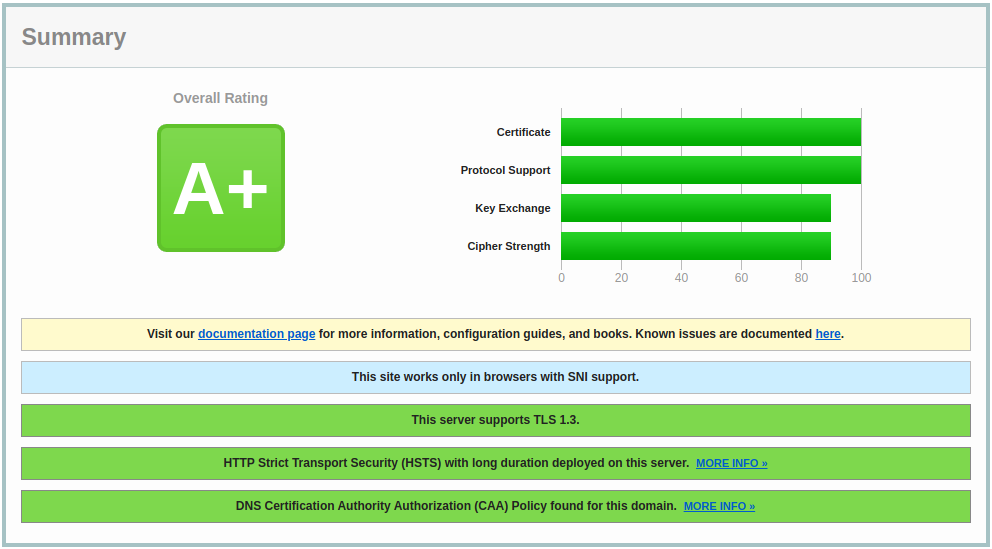
If you are using the Cloudfare Proxy and didn't remove TLS 1.0/1.1 in the TLS/SSL section, the best score you will get is B.
Wildcard Certificates
You need to have ACME DNS-01 Challenge configured to aquire wildcard certificates from Let's Encrypt. The setup above has been adjusted to do dnschallenge, even if you don't want to aquire a wildcard certificate. Simply replace the domain domain.de.
Authentication Middlewares
Traefik offers a lot of authentication middlewares (e.g. BasicAuth, ForwardAuth (if you can provide a authentication service))
Basic Auth
We are going to add a new router to our static service, which will provide files for download, behind an basic auth. First we have to extend our traefik service, with the htpasswd file for the service. This can be done by simply adding the following volume:
...
volumes:
  ...
  - "/srv/main/traefik/webfiles.htpasswd:/htpasswd/webfiles"
  ...
...
apt install -y apache2-utils
htpasswd -c /srv/main/traefik/webfiles.htpasswd <username>
Now we can add the new router to our static service:
    ...
    labels:
      ...
      - "traefik.http.routers.r_static_files.rule=Host(`files.domain.de`)"
      - "traefik.http.routers.r_static_files.entrypoints=websecure"
      - "traefik.http.middlewares.mw_static_files.addprefix.prefix=/static_files/"
      - "traefik.http.middlewares.mw_static_files_auth.basicauth.usersfile=/htpasswd/webfiles"
      - "traefik.http.routers.r_static_files.middlewares=mw_static_files@docker,mw_static_files_auth@docker,error40x@docker,error30x@docker"
    ...
We also need to enable directory listing by creating the configuration for this uri:
server {
    listen 80;
    server_name localhost;

    location / {
        root   /usr/share/nginx/html;
        index  index.html index.htm;
    }

    location /static_files {
        root /usr/share/nginx/html;
        autoindex on;
    }
}
Don't forget to add the created configuration to the volume section of the static service:
...
volumes:
  ...
  - "/srv/main/static/nginx.conf:/etc/nginx/conf.d/default.conf"
...
Redirect Middleware
You can also redirect a domain directly to another resource (e.g. your external webinterface of your mailserver):
      - "traefik.http.routers.r_redirect.rule=Host(`domain.de`)"
      - "traefik.http.routers.r_redirect.entrypoints=websecure"
      - "traefik.http.middlewares.mw_redirect.redirectregex.regex=https://domain.de"
      - "traefik.http.middlewares.mw_redirect.redirectregex.replacement=https://redirecteddomain.de"
      - "traefik.http.middlewares.mw_redirect.redirectregex.permanent=true"
      - "traefik.http.routers.r_redirect.middlewares=mw_redirect@docker,error40x@docker,error30x@docker"
Enable Metrics for Monitoring
You can enable the prometheus metrics for monitoring (checkout prometheus) by adding the following to your command:
- "--metrics.prometheus=true"
Don't forget to add your traefik container to the prometheus configuration:
...
scrape_configs:
   ...
  - job_name: 'traefik'
    static_configs:
      - targets: ['traefik:8080']